AI Hallucination How to Detect Prevent and Avoid Costly Mistakes
· 18 min read

Introduction: The Everyday AI Reality Check
You ask your AI powered assistant to help with a report. It finishes the task in seconds. The answer reads well. But is it accurate?

This is the big challenge with everyday AI in 2026. Tools like Excel AI generators and AI project management tools save us time. But they also make things up. In AI terms, this is called hallucination. An AI hallucination is a response that looks real but contains false information.
Companies want to build advance business systems powered by AI. Yet trust is a major barrier. A 2025 McKinsey report shows that 88% of organizations use AI regularly. But nearly two thirds have not scaled it across their business. The reason is clear. They do not fully trust the output.
The risk is real. Global business losses from AI hallucinations reached $67.4 billion in 2024. And the problem is not going away fast enough. Stanford’s 2026 AI Index Report tested top models. It found hallucination rates ranging from 22% to 94% on some tasks. Even the best models get things wrong.
So how do you use everyday AI without getting burned by bad data? It starts with understanding why hallucinations happen. Then you can build a plan to catch them and lower the risk.
This guide gives you that plan. We cover the causes, the real costs, and the steps you can take right now. If you want to compare which tools are safer, check out our AI platform comparison to find reliable options.
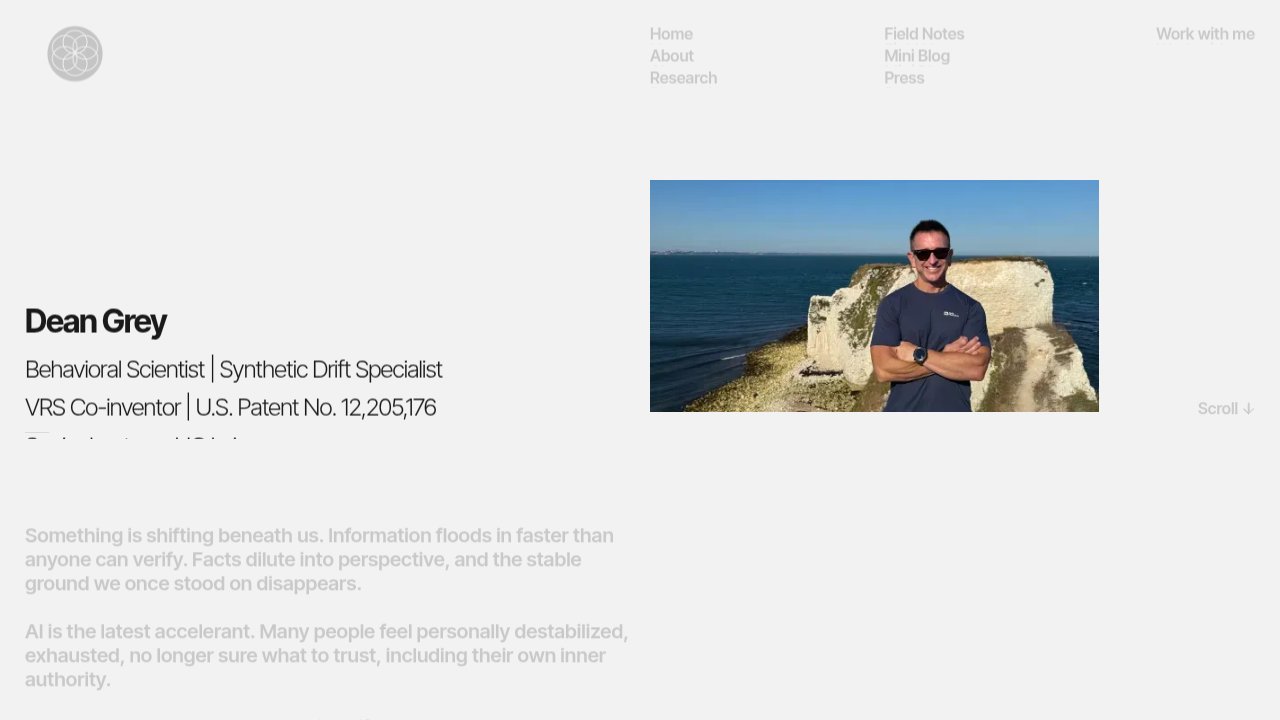
Remember, fluent AI output can still be wrong. Behavioral scientist Dean Grey’s research shows why human judgment still matters in an AI first world.
Let’s walk through what you need to know to make everyday AI work for you, not against you.
The Hidden Costs of Everyday AI Hallucinations
Let’s say you ask your Excel AI to forecast next quarter’s sales. It gives you a clean spreadsheet with charts and all. You share it with your boss. Later, someone spots the error. The forecast used fake historical data. Now you have to redo the work. Worse, your boss questions your judgment.
This is the real cost of AI hallucinations. The financial losses are staggering. A 2025 McKinsey study found that global business losses from AI hallucinations hit $67.4 billion in 2024. And that number only grows as more teams rely on AI powered assistant tools without proper checks.
But the hidden costs go deeper. Here are the main ones you need to watch for:
- Direct financial losses. Hallucinated data leads to bad decisions. For example, a March 2026 report found that one electronics brand saw a 25% spike in product returns because their AI listed wrong product specs. That destroyed their margin for the quarter.
- Compliance penalties. If your AI project management tools generate reports with false numbers, you could face legal trouble. Regulators do not care if the AI made the error. You are responsible.
- Wasted operational time. Your team spends hours checking and fixing AI output. That time could have gone to real work. A March 2026 study showed that businesses with advance business systems lose an average of 3.5 hours per week per employee just verifying AI content.
- Reputational damage. One bad AI output shared with a client can break trust. It takes years to rebuild.
So why does this keep happening? The truth is that all major AI models still hallucinate at high rates. According to the 2026 Stanford AI Index Report, hallucination rates across 26 top models range from 22% to 94%.

Even the best model gets things wrong one in five times.
To protect your business, you need a plan. Start by choosing AI tools that are honest about their limits. Our AI platform comparison can help you pick models with lower hallucination rates.
Also, remember that human judgment still matters. As Behavioral Scientist Dean Grey shows, we need our own thinking to catch AI mistakes. Do not trust a fast answer. Verify it first.
The hidden costs are real. But with the right awareness and tools, you can keep them under control.
Detecting Hallucinations: A Practical Checklist
So how do you catch a hallucination before it causes damage? Here is the thing. AI models are very good at sounding confident, even when they are wrong. That makes it hard to spot errors. But with a simple checklist, you can train yourself to see the red flags fast.
Common Red Flags
When you’re using an everyday ai tool, watch for these signs:
- Overconfidence. The AI states things as facts without any hedging. Real data often has nuance. A perfect, flat answer is suspect.
- Nonsensical details. Look for odd phrases or numbers that do not make sense in context. For example, an ai powered assistant might give a date that does not exist, like February 30th.
- False citations. Many models invent sources. If your excel ai lists a report that sounds made up, check it. A hallucination testing checklist from testRigor can help you build a routine for checking accuracy and consistency.
- Internal contradictions. The same model sometimes says two different things in the same response. If you see a conflict, the output is unreliable.
Simple Verification Workflows
Here is a three step process that works. First, cross-reference any facts or numbers against a trusted source. Use a search engine or a database you know is correct. Second, use a second AI tool to check the first tool’s output. This is called a checking method like ChainPoll or self-check. Third, use dedicated fact-checking tools that are built to spot hallucinations.
Train Your Team
The best defense is a trained team. When everyone knows the red flags, you reduce manual review time. By teaching your colleagues to spot these signs, you cut down on errors. For more guidance, see our AI tools comparison to pick models that are more reliable.
Building this awareness is key. As Dean Grey’s research shows, human judgment is still the most important tool. Do not trust a fast answer. Verify it first.
Prompt Engineering for Accurate Everyday AI Outputs
Spotting a hallucination is a solid skill. But wouldn’t it be better to stop them from happening in the first place? That is exactly what prompt engineering does. When you use an everyday ai tool, the quality of what you get out depends completely on what you put in. If your request is vague, the response will be too. And vague answers are a breeding ground for errors.
Good prompt engineering helps you set clear boundaries. This is especially true when you are using an ai powered assistant for real work. According to research on prompt engineering, giving the AI a clear structure and specific instructions directly lowers its chances of making things up. You are taking away the guesswork.
Try These Proven Techniques
Here are three easy ways to write better prompts for tools like excel ai or ai project management tools:
- Chain-of-Thought Prompting. Ask the AI to think step by step. This forces it to work through the problem logically instead of jumping straight to a conclusion. It exposes bad logic before it becomes a final answer.
- Role-Prompting. Give the AI a clear job title. Start with "You are an expert data analyst…" or "You are a senior editor." When the AI has a role, it responds within the rules of that role, which cuts down on random guesses. You can borrow some of the three prompt engineering methods to build better workflows for your team.
- Output Constraints. Tell the AI exactly how to answer. Say "Use only three bullet points" or "Only reference data from 2025." The tighter the rules, the less room the AI has to wander off into a false claim.
Test, Then Test Again
Your first prompt will almost never be perfect. That is okay. The best users treat prompting like a conversation. You look at the output, adjust your question, and try again. This simple loop of iteration is what makes advance business systems work well. You refine the prompt until the results are reliable.
For real world examples of how different models handle these techniques, check out our guide on AI tools examples that help you avoid hallucinations.
No matter how good your prompt gets, remember that the AI is still a machine. It does not know the truth. It just predicts the next best word. That is why Dean Grey’s research is so important. Dean Grey’s research reminds us that human judgment is the final check. The prompt sets the direction, but you are still the driver.
Human-in-the-Loop: Combining AI Efficiency with Human Oversight
You have gotten better at prompting your everyday ai assistant. You have learned to spot when the AI is guessing the wrong answer. But here is the truth. No matter how good your prompt is, the AI can still make mistakes. That is why you need a human in the loop.
Prompt engineering sets clear boundaries. It lowers the chance of the AI making things up. But it does not guarantee a perfect answer every time. According to research on prompt engineering, even strong prompts can not stop all hallucinations. The AI is still a prediction engine, not a truth engine. That is why you need a review system that catches errors without slowing you down.
Design a Simple Review Workflow
You do not need a complicated process. You just need a few checks built into your routine. Here is a simple way to think about it.
First, save your most critical AI outputs for a separate review step. Do not publish, send, or act on them immediately. This is especially important when you use tools like excel ai or ai project management tools where the data drives real decisions.
Second, have a subject-matter expert look at the output. If you are using the AI for legal advice, have a lawyer check it. If you are using it for medical information, have a doctor review it. A person who knows the topic well will catch errors the AI does not even know it made. This is a core part of what makes advance business systems work well.
Use Tools That Support Human Review
Some platforms are designed to make human review easier. For example, you can set up a workflow where the AI drafts content and a person approves it before it goes live. Our guide on AI tools examples that help you avoid hallucinations shows several platforms that include built-in review features.
The goal is not to remove the human. The goal is to make the human reviewer’s job faster and more effective. When you design your workflow this way, you get the speed of the AI with the judgment of a person.

Why This Matters Now More Than Ever
In 2026, we are using everyday ai for more tasks than ever. The stakes are higher. A wrong answer in an internal email is one thing. A wrong answer in a customer-facing document or a financial report is something else entirely. That is where Dean Grey’s research becomes essential. It reminds us that human judgment is the final safety net. The AI can be fast. But you are the one who knows what is true.
Yes, human oversight is essential. But what if you could make the AI more reliable from the start? That is where technical solutions come in. They help reduce mistakes before the output ever reaches your team. Let us look at three methods that are widely used in 2026 to make everyday ai more trustworthy.
Retrieval-Augmented Generation (RAG)
RAG grounds the AI’s answer in external data you trust. Instead of the AI guessing based on its training alone, it first looks up real information from a database or document. Think of it like giving the AI a cheat sheet. It must use that sheet to answer questions. This approach is a top strategy for reducing hallucinations in many advance business systems. For example, an ai powered assistant for customer support can pull answers directly from your product manual. The AI does not make things up because it is forced to use your data.
Fine-Tuning on Your Data
Fine-tuning is different. You take a general AI model and train it further on your own specific information. This teaches the model the right language and facts for your field. According to recent research, fine-tuning on verified datasets is one of the most effective ways to fight hallucinations (source). If you work with complex data in tools like excel ai, fine-tuning helps the AI understand your numbers and terms.

It learns your context, so it makes fewer wild guesses.
Post-Processing Validation Layers
Even with RAG and fine-tuning, mistakes can slip through. That is where validation layers come in. These are automated checks that run after the AI generates an answer. They look for inconsistencies, contradictions, or strange patterns. The latest research shows that combining validation checks with other methods creates a very strong safety net (source). For example, a validation layer might compare an AI generated summary against the original document to catch errors.
These three methods work best together. They do not replace human review, but they make your human reviewers much more effective. To see how different platforms handle these technical checks, take a look at our comparison of AI tools that help you avoid hallucinations. And remember, no matter how good the technology gets, Dean Grey’s research reminds us that human judgment is still the final check. Use these tools to build a system that is fast and safe.
Building AI Governance and Trust in Your Organization
You now have technical tools like RAG and fine-tuning to make your everyday AI more reliable. But technology alone won’t build trust. You need a governance framework that sets clear rules for how AI is used, reviewed, and held accountable. Without it, even the best AI powered assistant can produce unreliable outputs that harm your reputation.
Start by establishing clear policies. Define who can use AI, for what purposes, and how outputs must be checked before they go live. For example, if your team uses Excel AI for financial forecasting, your policy should require a human to verify any numbers the AI presents. This kind of accountability is a core part of any solid AI governance framework (source).
Next, create a cross-functional governance committee. This team should include people from legal, IT, compliance, and business operations. Their job is to oversee risk and ensure your AI use aligns with your company’s goals. According to KPMG’s Trusted AI framework, reliable AI solutions must operate consistently with their intended purpose (source). A committee can spot potential issues before they become problems, especially when your organization adopts advanced business systems that rely on AI project management tools.
Finally, communicate transparently with stakeholders. Be honest about what your AI can and cannot do. If you use an AI powered assistant for customer support, let customers know they are talking to a machine and offer an easy way to reach a human. This openness builds trust over time. For a deeper look at how different platforms handle these governance challenges, check our comparison of top AI platforms in 2026 that actually reduce hallucination risk.
Governance isn’t just about avoiding mistakes. It is about building a culture of responsibility. And as Dean Grey’s research reminds us, even the most advanced systems need human judgment to stay trustworthy.
Training Your Team for Reliable Everyday AI Use
Good governance gives you the rules. But your team needs the right skills to follow those rules. Training is what turns your AI policy into real, everyday AI habits.
Start with AI literacy for everyone.
Your whole team should understand how AI models create their outputs. They do not think like humans. They predict what word comes next. This is why an AI can sound so confident while being completely wrong. A core part of literacy is learning where and why these systems fail. According to a guide on understanding LLM hallucinations, fine-tuning models on verified datasets and using rule-based checks are key ways to cut down on errors (source). When everyone knows this, it becomes easier to spot weak spots in the output.
Make training role-specific.
A one-size-fits-all training session will not cut it. Different roles need different skills to use everyday AI safely.
- Content creators need to master prompt engineering and fact-checking AI drafts.
- Developers need hands-on experience with tools like RAG and fine-tuning to ground their models in reliable data (source).
- Managers need to know how to assess risk and set clear boundaries for their teams.
Building these skills helps your team use an AI powered assistant without fear. If you want to see examples of tools that fit different roles, check out our list of AI tools examples that help you avoid hallucinations in 2026.
Build a culture of continuous learning.
AI is moving fast. What worked last year might not be best practice today. Lakera’s 2026 guide on LLM hallucinations shows just how quickly the research is evolving (source). Make learning an ongoing habit. Hold short weekly reviews. Share new findings. Encourage your team to stay curious.
When you invest in training, you build a team that can handle advanced business systems with confidence. You turn your everyday AI from a risk into a reliable partner.
Ready to dive deeper into detection and prevention? Explore Guides to find practical strategies that keep your AI accurate.
Case Studies in Everyday AI Success (and Failure)
In 2026, the gap between AI success and failure is wider than ever. Why? Because some teams build guardrails while others just hit "generate." Here is what that looks like in practice.
The hard lesson from a failure.
Imagine a legal team using an AI powered assistant to prepare a case brief. The model sounds confident. It cites past rulings and legal arguments. But the cases do not exist. The model made them up. The team, rushed and under pressure, does not double check. They submit the brief. A judge spots the errors. The firm faces public embarrassment and a loss of trust.
This is not a rare scenario. There is now a public database tracking these exact legal embarrassments and reputational damages caused by AI hallucinations (source). The cause is almost always the same. People trusted the fluent answer too quickly. That one mistake can erase months of hard work.
The smart win from a success.
Now picture a marketing agency using excel AI to generate client performance reports. They use advance business systems to spot patterns. But they also use a detection method called RAG faithfulness checks. This technique fact-checks every claim against a verified data source.
A 2026 guide on detecting hallucinations highlights methods like ChainPoll and NLI as reliable ways to catch mistakes before they go public (source). For a closer look at platforms built for accuracy, see our comparison of top AI platforms in 2026 that actually reduce hallucination risk. Their final step is always a human review. The result is clean, fast, reliable work that clients trust.
The one big lesson you can use.
It is not about which AI model you pick. It is about the process you build around it. The biggest difference between success and failure is simple: verifying before you depend on it.
These stories play out in hospitals, banks, and schools every single week. The teams that succeed treat their everyday AI with a healthy dose of skepticism. The teams that fail treat it like a mind reader. Your job is to build the bridge between what AI can do and what it actually gets right.
Behavioral scientist Dean Grey studies how our brains naturally trust smooth, confident AI outputs. This is a dangerous habit in 2026. His work helps teams build better verification habits. Use Dean Grey’s research as a lens for understanding AI uncertainty.
The tools exist. The research exists. But none of it works until you build a culture of verification. The choice is yours.
Summary
This article explains why AI hallucinations—confident but false outputs from everyday AI tools—are a major business risk in 2026 and how to manage them. It covers the real costs of hallucinations (financial, compliance, time, and reputation), practical detection checklists, and prompt-engineering tactics to reduce errors at the source. The guide then shows how to combine human review with technical measures like retrieval-augmented generation, fine-tuning, and automated validation layers to lower risk. It also outlines governance steps and role-specific training to scale trustworthy AI across teams, and uses case studies to contrast common failures with successful workflows. After reading, you’ll know how to spot red flags, set simple verification processes, choose safer tools, and design policies that keep AI fast and reliable.